).
).Attribute relationships provide supplementary, descriptive
information about levels. For example, a Customer
level may have members (Customers) with attribute relationships such as
address, contact person, long description, phone number, and region. You
can see attribute relationships in the Dimension
Selection window. The following example shows two attribute relationships
for the Product Family level ().
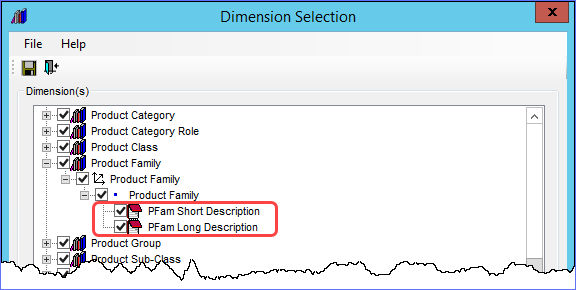
Attribute relationships can be used in Stratum.Viewer several ways, such as displayed on rows and columns of views, used for filtering purposes, and used to build user list expressions. They are also used as display columns and for searching purposes in the Select and Advanced Select Members windows within Stratum.Viewer.
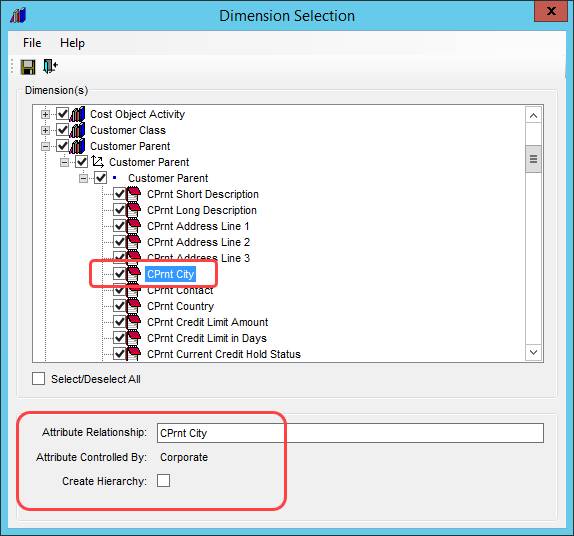
Attribute values are controlled either on the corporate side of things in Stratum.Server or using Stratum.Viewer’s Master Data Import functionality. Both types can be used in the same way in Viewer. The Attribute Controlled By property in the Dimension selection window tells you if an attribute is Corporate or User Controlled. Details follow about how and where to maintain each type.
Corporate Controlled Attribute Relationships – Their values originate from your Corporate busines systems and are stored in your Stratum.Server database. They can be selected for use and maintained in Stratum.Connector. Change their names, create hierarchies from them, and select or deselect them to control availability in Viewer. The next image shows the CPrnt City attribute relationship, which is Corporate controlled and belongs to the Customer Parent level.
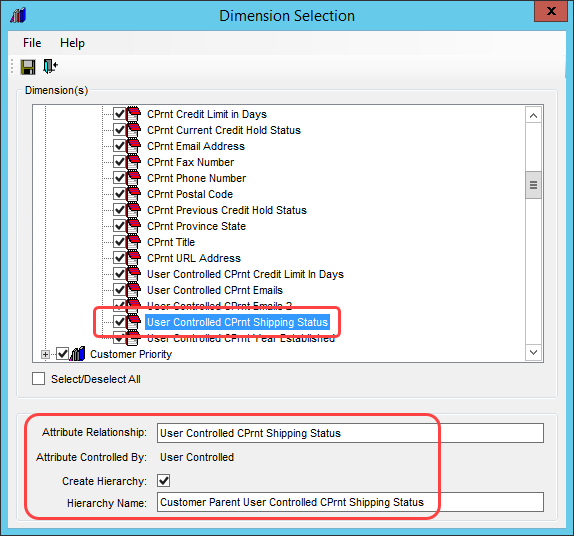
User Controlled Attribute Relationships – Their values originate from an Excel spreadsheet and become part of Stratum using Stratum.Viewer’s Master Data Import functionality.* Use Stratum.Viewer’s User Controlled Attribute Maintenance functionality to define attributes, maintain attribute properties, create or remove hierarchies based on the attributes, or delete the attributes. In Connector, you can view their properties including seeing any hierarchy created from the attribute. The next image shows a User Controlled attribute for the Customer Parent level. It was created in Attribute Maintenance, and a hierarchy was also created for it there.
*Note: User Controlled Attribute Maintenance functionality is only available for implementations running Stratum.Server on a Windows SQL server and that have a license for the Stratum Analyst Hub. It is not available for implementations running Stratum.Server on an IBM i Server.