Properties known as attribute relationships can be displayed for levels in views – the properties exist for all levels and provide extra, descriptive information about each level. Properties for levels from time hierarchies show you the specific calendar details behind the based and absolute units of time in the levels. You can display the properties in views and use them to sort or filter levels in views.
· Available Time Properties by Level
· Examples of Time Properties Displayed in Views
The following table shows all properties for levels from absolute and based Weeks hierarchies. Similarly structured properties exist in Stratum.Viewer for levels from other units of time (Periods, Days, Months, and Quarters).
Hierarchies: |
Levels: |
Attribute Relationships: |
|---|---|---|
Year Weeks |
Year
|
|
|
Weeks
|
|
Weeks |
Weeks |
|
Year Based Weeks Based |
Year Based |
|
|
Weeks Based |
|
Rolling Year Based Weeks Based |
Year Based |
|
|
Weeks Based |
|
Rolling Weeks Based |
Weeks Based |
|
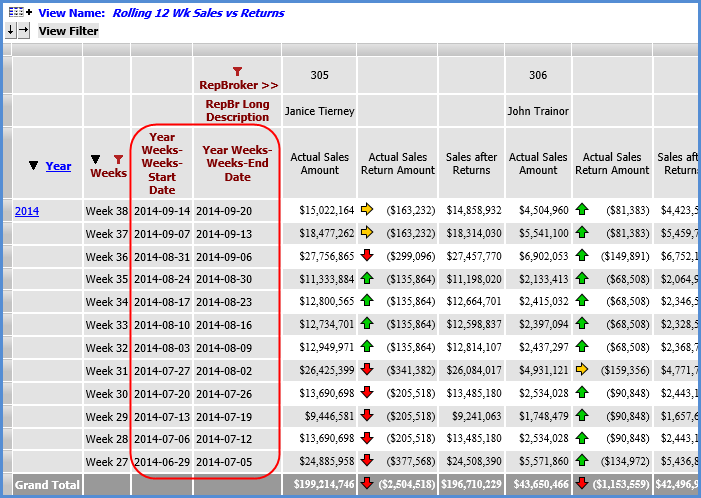
The first example is a view that shows sales versus returns for a rolling period of 12 weeks (the current week and eleven weeks prior). The Weeks level in the view belongs to the Year Weeks time hierarchy. There are two time properties showing for Weeks -- the Start Date and End Date. These properties make it easy to tell what calendar dates fall within each week currently displayed in the view.
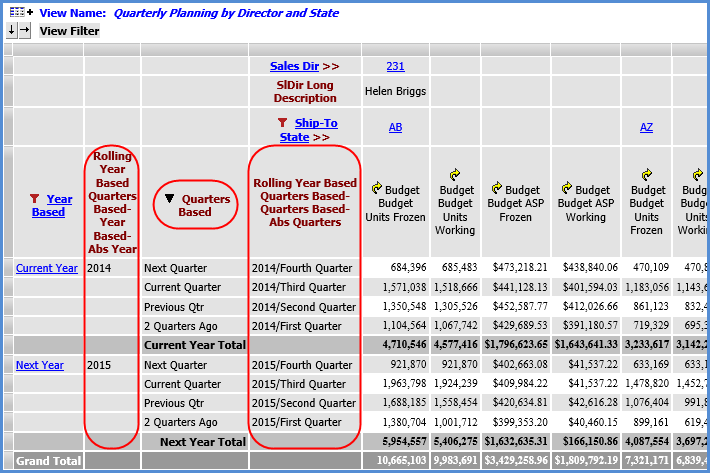
The next example view shows information about Current Year and Next Year Budget details by quarter. Time properties for the Year Based level tell me that Current Year is 2014 and Next Year is 2015. Time properties for the Quarters Based level tell me which quarter and year are represented by Next Quarter, Current Quarter, Previous Qtr, and 2 Quarters Ago. The Quarters based level is sorted to organize quarters from most current to least current.