|
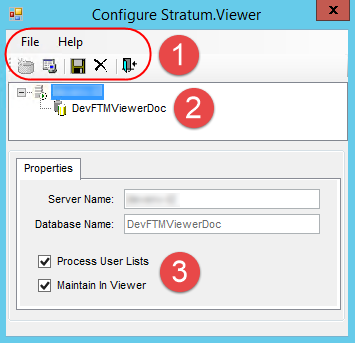
Menus
and Toolbar - There are standard File and Help menus at
the top of selection windows.
Use options on the File menu or the icons below
it to carry out the following actions.
New
 -
Click to open the Define
Stratum.Viewer Data Source window and define the Stratum.Viewer
database (the data source) for use with your Stratum.Connector
implementation. Once you have configured a Stratum.Viewer
database to Stratum.Connector, certain types of updates and
actions will be carried out with each process of the Analysis
Services database. Those
actions include registering the Analysis Services database
in Stratum.Viewer, batch processing of Stratum.Viewer dynamic
user lists, and updating Stratum.Viewer roles in the Analysis
Services database. See also Introduction
to Types of Processes. The New icon will be grayed out
once you define a database. -
Click to open the Define
Stratum.Viewer Data Source window and define the Stratum.Viewer
database (the data source) for use with your Stratum.Connector
implementation. Once you have configured a Stratum.Viewer
database to Stratum.Connector, certain types of updates and
actions will be carried out with each process of the Analysis
Services database. Those
actions include registering the Analysis Services database
in Stratum.Viewer, batch processing of Stratum.Viewer dynamic
user lists, and updating Stratum.Viewer roles in the Analysis
Services database. See also Introduction
to Types of Processes. The New icon will be grayed out
once you define a database. Edit
 - Click
when you edit information about the Stratum.Viewer database
that has been defined as the data source. For example, if
the location (SQL Server server) for it has changed. The Edit
icon opens the Define Stratum.Viewer Data Source window. - Click
when you edit information about the Stratum.Viewer database
that has been defined as the data source. For example, if
the location (SQL Server server) for it has changed. The Edit
icon opens the Define Stratum.Viewer Data Source window.
Save
 - Click to save changes made
to the user list properties in the window. - Click to save changes made
to the user list properties in the window. Delete
 - Click to delete the currently
defined connection properties between Stratum.Connector and
the Stratum.Viewer database. You will be prompted to confirm
the deletion. This task does not delete the database, but
it does remove all Stratum.Connector properties required for
it to connect to and update the database. - Click to delete the currently
defined connection properties between Stratum.Connector and
the Stratum.Viewer database. You will be prompted to confirm
the deletion. This task does not delete the database, but
it does remove all Stratum.Connector properties required for
it to connect to and update the database. Exit
 - Click to close the window. - Click to close the window.
Use options on the Help menu to access the
help file or version information about Stratum.Connector. |
 |
Properties
- The properties in this section are used to control whether or
not Stratum.Planner user lists will be available in Stratum.Viewer.
Process
User Lists - Select this checkbox if you want the user
lists to be available in Stratum.Viewer. Lists will be migrated
into Stratum.Viewer when the Analysis Services database is
processed by Stratum.Connector. When additional database processes
occur in the future, after the initial migration, Stratum.Connector
will check for and migrate any new Stratum.Planner user lists.
The application also continues to migrate all attributes for
previously migrated lists. This means attribute changes made
in Stratum.Planner will be reflected in the lists when they
are used in Stratum.Viewer. Attributes that are migrated include
members and user list properties such as description and their
global or personal type. Stratum.Connector also checks that
lists meet the following condition. This check makes sure
lists will function in Stratum.Viewer. The condition is: The Owner ID
associated with the user lists in Stratum.Planner is a valid
User ID in Stratum.Viewer. Maintain
In Viewer - This checkbox is available for use only
when the Process User Lists checkbox has been selected. Otherwise,
the checkbox is grayed out and inactive. If Maintain in Viewer
is selected, after the initial migration, these user lists
will no longer be updated by Stratum.Connector. They can only
be maintained via Stratum.Viewer. |