|
Menus
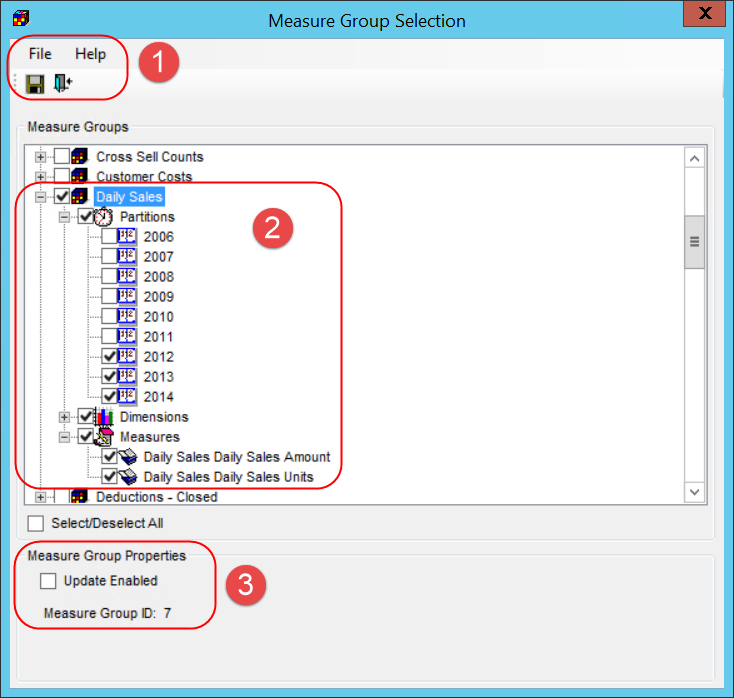
and Toolbar - There are standard File and Help menus at
the top of selection windows. Use options on the File menu or
the icons below it to save edits in |
|
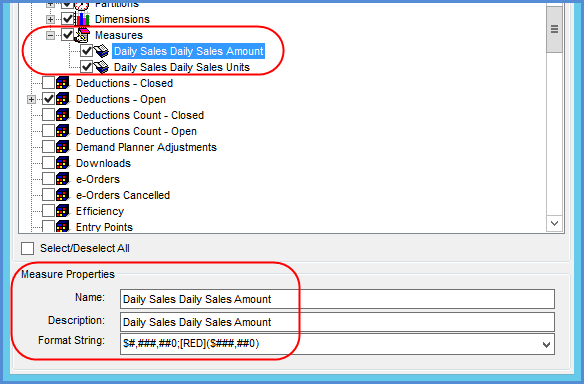
Measure Groups - Use this section to select or de-select the measure groups and related objects for your database -- the partitions, dimensions, and measures.
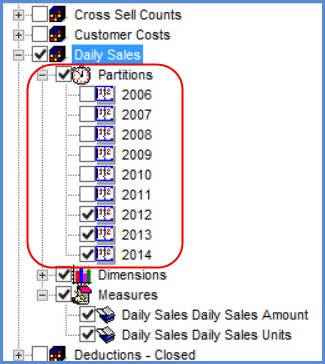
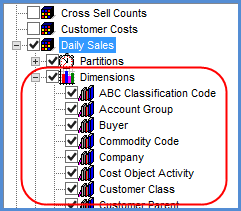
The prior image shows an example of an expanded Measures node, in this case for a Daily Sales measure group. Here are examples of the expanded Partitions and Dimensions nodes for that group. Note that Stratum.Viewer will only display data for the measures selected from a group in relation to the selected partitions and dimensions. For example, data from the 2012 partition would not display for Daily Sales in Stratum.Viewer if that partition wasn’t selected for it in Stratum.Connector for Viewer.
|
|
Measure Group Properties -- If you click a measure group, an Update Enabled checkbox displays at the bottom of this window. The checkbox is deselected by default. Selecting the checkbox will allow Stratum.Viewer administrators to give users Update access to any measures in the group for planning purposes. Also, the unique ID associated with this group displays at the bottom of the window. Measure Properties – If you click an individual measure in the group, you will see its properties at the bottom of this window. All properties can be edited. Note: All properties will remain disabled in the case of measures that haven't been selected for your database and in the case of partitions and dimensions.
|

 or close
 a window. Use options on the
Help menu to access the help file or version information about
Stratum.Connector for Viewer.
a window. Use options on the
Help menu to access the help file or version information about
Stratum.Connector for Viewer.
 the nodes for objects to see subsequent nodes or detail for
an object. Then use the checkboxes of individual partitions,
dimensions, or measures to add or remove them. Checkboxes
of objects belonging to the same measure group are interdependent,
and the window will automatically select or de-select related
objects for you as you use the checkboxes. For example:
the nodes for objects to see subsequent nodes or detail for
an object. Then use the checkboxes of individual partitions,
dimensions, or measures to add or remove them. Checkboxes
of objects belonging to the same measure group are interdependent,
and the window will automatically select or de-select related
objects for you as you use the checkboxes. For example: