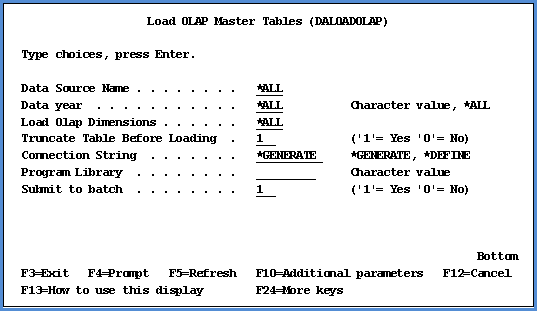
Running the DALOADOLAP command creates for each dimension a list of the distinct dimension values in all the Structure Code tables of the storage database. Then, a MASTERxx table will be created for each dimension and populated with the list of dimension values. These tables are used when the DACRTOMAST command is run to create the MASTxx tables.
The DALOADOLAP command typically needs to be run just once. It can be re-run, though, if you want to remove from the MASTERxx tables records that are no longer in the Stratum Master Files or Structure Code tables. Or, you can run it for just a subset of the storage database. For example, if new dimensions are added to the database after you have already run this command for the entire database, then the command can be run again for only the new dimensions, years, and data sources. By also turning on the Maintain OLAP parameter of the DALOAD, DACHGSET (Apply Change Set), and DAGRPCHG (Apply Group Change Set) commands, the MASTERxx tables will be maintained during the nightly load process for the Stratum database.
|
Parameter |
Description and Choices |
|
Data Source Name |
Controls which data sources are used during the command execution. *ALL DALOADOLAP will process for all of the data sources. Data Source Name DALOADOLAP will load distinct dimension values for the specified data source. Example: DATASOURCE (DSDS) |
|
Data Year
|
Controls which years of data will be processed during command execution. *ALL DALOADOLAP will process all years for the specified data source. Year DALOADOLAP will process only the given year for the specified data source. A single year can be specified. If several years worth of data need to be processed, run the command for each year and each time specify the particular year you need to process. |
|
Load Olap Dimensions |
Controls which dimensions are processed during DALOADOLAP. *ALL DALOADOLAP will process all dimensions. Dimension Ids DALOADOLAP will process the specified dimension. Enter the dimensions in a comma-delimited format. Example: 2,3. |
|
Truncate Table Before Loading |
Set the parameter to 1 (Yes) if you want MASTERxx tables to be cleared before they are loaded with distinct dimension value information. For example, you may run DALOADOLAP for all data sources, years, and dimensions and then need to run the command again only for certain data sources, dimensions, and years specified. You can set this parameter to 1 to clear old information from the MASTERxx tables before the new information is loaded. Or, you can set the parameter to 0 (No) if you prefer not to truncate (clear) tables. Then, distinct dimension values resulting from the subsequent command execution will be accumulated into the tables along with information from previous instances of executing the command. |
|
Connection String |
Defines how this command process connects to the Stratum storage database. Valid entries are: *GENERATE The connection string will generate the DSN from the local Relational Database Directory Entry, the DBLIB from the library where file STCSUS10 resides, the USERID from the current user, and the PASSWORD from the current user. A local Relational Database Directory must be defined for the command to process. The library list must contain a Stratum database library name. *DEFINE The connection string will be defined from parameters. If *DEFINE is selected, these four *DEFINE parameters must be entered for the connection string:
|
|
Program Library
|
Indicates the Stratum server library name. The program library will be added to the library list prior to command processing. |
|
Submit to batch |
Determines how a command job will be submitted. Valid entries are: 1= Yes Set the parameter to 1 if you want to submit the job to batch. 0 = No Set the parameter to 0 if you want to run the job online. |
|
Log File Name |
Can be used to designate the Integrated File System full path name of a log file for the command run, if you choose to have a log file generated. Only one file can be used at a time. If executing multiple runs at the same time, define different log file names. |
|
Inform record count
|
Can be used to indicate the number of records to process between informational messages about processing. Number The number of records to process between informational messages. If the setting is too low, it will cause large log files and slower performance. |
|
Chain Length Warning |
A Chain Length Warning occurs when a command is forced to allocate extra memory at Data Summary Level (DSL) load time because the number of header records that are being loaded exceeds the number of estimated number headers. Number If the number of chains exceeds the number defined here, a warning message is printed. This message does not mean that the process will fail, only that it is not functioning at peak performance. |
|
Debug |
Determines whether or not Debug messages will be generated during command processing. The Debug messages include all SQL statements used and other miscellaneous messages needed to debug any problem that may occur during processing. Valid entries are: 1= Yes Set the parameter to 1 if you want messages generated. 0 = No Set the parameter to 0 if you do not want messages generated. |