
|
Dimension(s)
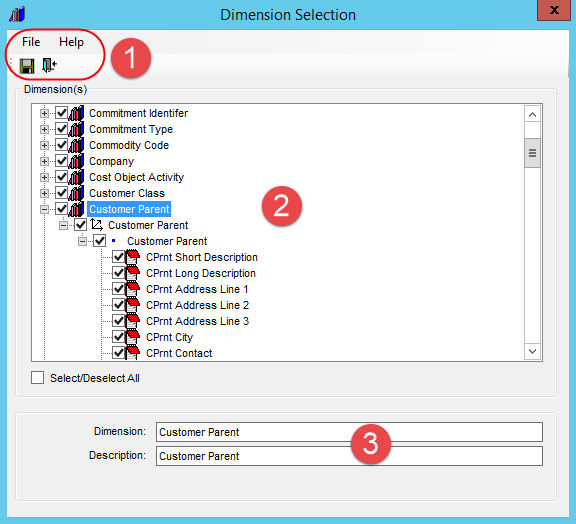
- Use this section to select or de-select the dimensions and related
objects for your database -- the hierarchies, levels,
and attribute relationships.
Individual
Objects - Expand  the nodes for objects to see subsequent nodes or detail for
an object. Then use the checkboxes of individual dimensions,
hierarchies, levels, or attribute relationships to add or
remove them. Checkboxes of objects belonging to the same dimension
are interdependent, and the window will automatically select
or de-select related objects for you as you use the checkboxes.
For example:
the nodes for objects to see subsequent nodes or detail for
an object. Then use the checkboxes of individual dimensions,
hierarchies, levels, or attribute relationships to add or
remove them. Checkboxes of objects belonging to the same dimension
are interdependent, and the window will automatically select
or de-select related objects for you as you use the checkboxes.
For example:
Selecting
a dimension automatically selects all of its hierarchies,
levels, and attribute relationships. De-selecting
a hierarchy automatically de-selects its level plus the dimension
to which it belongs. Selecting
a level automatically selects its attribute relationships
plus the hierarchy and dimension to which it belongs. Select/Deselect
All - Use this checkbox to select or deselect all objects
in the window at once. |
 |
Properties
- Click on a dimension, hierarchy, or level to see their properties
and edit them. Click an attribute relationship to edit its properties
or create
a hierarchy from it.
Note:
All properties will remain disabled in the case of objects that
haven't been selected for your database.
Attribute
Relationships  -
You
can change the name, which defaults to the Stratum.Planner
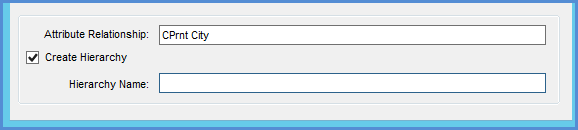
name. You can use the Create Hierarchy checkbox when you need
to create a hierarchy from an attribute relationship. The
Hierarchy Name field only displays when the checkbox is selected. -
You
can change the name, which defaults to the Stratum.Planner
name. You can use the Create Hierarchy checkbox when you need
to create a hierarchy from an attribute relationship. The
Hierarchy Name field only displays when the checkbox is selected. Selecting “Create
Hierarchy” will create a new hierarchy with the specified
name. This new hierarchy will be part of the associated dimension
and can be used to display data in the Stratum.Viewer grid
the same as other hierarchies. Security
defined for the associated dimension will be applied to this
new hierarchy. The new hierarchy will be available to Stratum.Viewer
users after the next Analysis Services cube
process. To
remove this type of hierarchy that you previously set up,
click the related attribute relationship and then de-select
the Create Hierarchy checkbox. The next cube process will
remove all references to this hierarchy from Stratum.Viewer.
|

 or close
 a window. Use options on the
Help menu to access the help file or version information about
Stratum.Connector for Viewer.
a window. Use options on the
Help menu to access the help file or version information about
Stratum.Connector for Viewer. , Hierarchies
 , and Levels
 -
You can change the name and description, which default to
their Stratum.Planner name and description.
-
You can change the name and description, which default to
their Stratum.Planner name and description.