
|
Select an option for the type of Stratum.Server database (the data source) that you are using, either SQL Server or DB2 for i. |
|
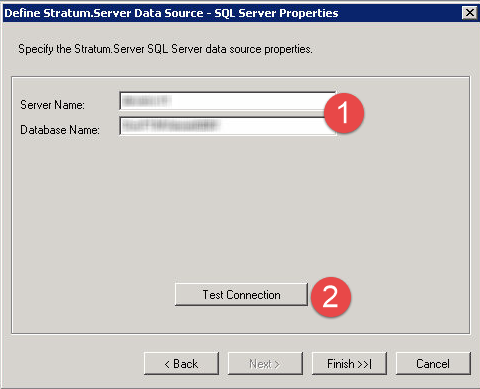
Server Name and Database Name - Enter the name of your Stratum.Server database and name of the SQL Server server on which it resides. |
|
Test Connection - Use this button to test the ability to connect to the Stratum.Server database. Stratum.Connector for Viewer will attempt to connect to the specified Stratum.Server database using the Windows credentials of the person currently using the application. You will be provided with a Connection Succeeded message if the connection is successful. You will be provided with a Connection Failed message if a connection cannot be made (for example, if the person currently using the application doesn't have permission to access the database). Additional validations occur when you click Finish, such as verifying that the GILOADOLAP and GICRTOMAST Stratum.Server programs have been run for the database. See also Run Master File Commands and Enable OLAP Parameter/Switch. |
|
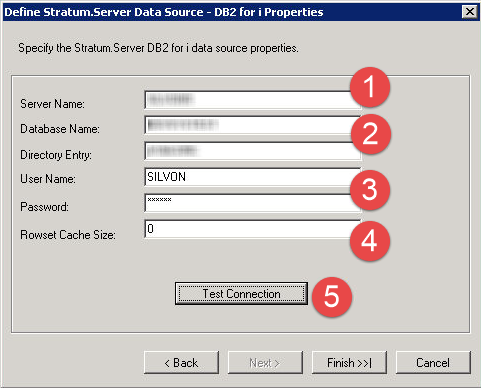
Server Name and Database Name - Enter the name of your Stratum.Server database and name of the IBM i server on which it resides. |
|
Directory Entry - Enter the directory entry of your Stratum.Server database. |
|
User Name and Password - Enter a user name and password for Stratum.Connector for Viewer to use whenever it needs to connect to the database. |
|
Rowset Cache Size - Optionally customize the rowset cache size. This property impacts how many rows of data are pre-fetched by the Microsoft OLE DB Provider for DB2 provider during data retrieval for Stratum.Connector for Viewer. The property can be set to a value in the range of 0 to 200. This property is valid only for a SQL Server 2008 R2 Enterprise edition or SQL Server 2012 Enterprise edition implementation. |
|
Test Connection - Use this button to test the ability to connect to the Stratum.Server database. Stratum.Connector for Viewer will attempt to connect to the specified Stratum.Server database using the specified user name and password. You will be provided with a Connection Succeeded message if the connection is successful. You will be provided with a Connection Failed message if a connection cannot be made (for example, if the person currently using the application doesn't have permission to access the database). Additional validations occur when you click Finish, such as verifying that the DALOADOLAP and DACRTOMAST Stratum.Server programs have been run for the database. See also Run Master File Commands and Enable OLAP Parameter/Switch. |


